
.rpt Inspector Professional Suite for Crystal Reports
for Crystal Reports
.rpt Inspector Online a new SaaS / cloud solution is now released and is FREE! click here to get started!
Announcement: .rpt Inspector Professional Suite and .rpt Inspector Enterprise Suite are now in End Of Life (EOL) status.
.rpt Inspector Online, a new FREE cloud / SaaS product is now in public beta open to all available here: .rpt Inspector Online
.rpt Inspector Online runs in modern browsers (Mozilla Firefox and Google Chrome are supported, Internet Explorer support may be offered later) and supports Windows 7, Windows 8.1, and Windows 10 as well native support for Crystal Reports 2016 down to Crystal Reports 8.5 reports.
.rpt Inspector Online includes analysis, documentation tools, and now Change Data Source and Formula Editor features with additional in development. It is our intention to gradually add additional features, and have feature parity with the desktop tools (where possible) in later versions.Use the tools in .rpt Inspector Professional Suite to find and filter in common Crystal Reports design objects and properties (formulas, parameters, parameter default values, text, headers, footers, size, driver, data source, database, printer, fonts, running totals, sql expressions, etc.) across the selected Crystal Reports and modify or document them all at the same time -- all with visual feedback.
Read further for details and screen shots of each of the 16 tools which are integrated in to this powerful suite. Waiting for Crystal Reports 2008 support? Click for details.
Improved in v3 Data source /
Database Migration and Conversion
You can literally make changes to hundreds of Crystal Report's data sources and/or databases, update field mappings, and more in minutes.
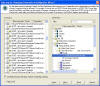
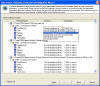
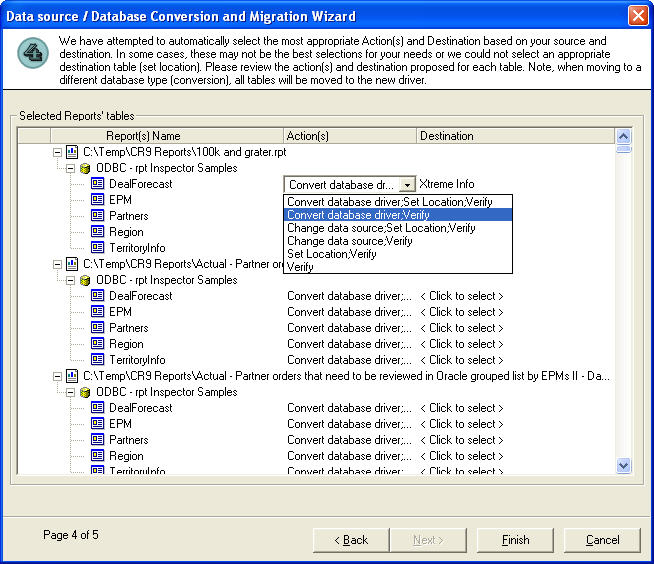
- Mass ... Change Data Source, Set Location, Convert Driver, Verify Database
- change your data source?
- move your Crystal Reports to a different database with the same tables & fields?
(i.e. from a development database -- to a staging / QA database -- to a production database) - migrate your Crystal Reports to a different database and/or different driver?
(i.e. from Oracle 9i to SQL Server 2000) - rename or remove fields and update the mappings in your Crystal Reports to reflect the
changes?
(i.e. changed field Employee_Number to EmployeeNo)
You can literally make changes to hundreds of Crystal Report's data sources and/or databases, update field mappings, and more in minutes.

| Database Connection Method | Supported Databases | |||||||
|
Access |
Excel |
DB2 |
Informix | Oracle |
SQL |
Sybase | Other | |
| ODBC | Yes - However Not Tested In Our Labs | |||||||
| New as of 3.02 - DAO | ||||||||
| OLE DB | Yes - However Not Tested In Our Labs | |||||||
| Native Driver | ||||||||
| Note that there is currently limited support for stored procedures (currently only stored procedures without parameters are supported as we do not prompt for those parameters -- this is expected in a future version). | ||||||||
Specify your ...
- Crystal Reports to work with
- source(s) (each Crystal Report's table / view / stored procedure -- is a source)
- destination database
- action(s) to perform for each of the selected source(s) or use the wizard's
suggestions
(for each source in the report, you can specify a different action -- Change Data Source, Set Location, Convert Driver, Verify Database)
- destination table / view / stored procedure (the wizard will make a suggestion if it can)
Database Analyzer
To further ease your efforts, you can group by any of these properties to quickly and easily get to the information your looking for.
- Find, Analyze, and Group By Data Source / Database, Drivers, Connect Strings, Tables, Fields (including quickly those in use and not in use), and more ...
|
Such as ... |
|
|
|
- which fields are in use or not in use?
- what field types (string, numeric, etc.) are used for your fields?
- what database, driver, etc. is used in your Crystal Reports to do an impact analysis?
To further ease your efforts, you can group by any of these properties to quickly and easily get to the information your looking for.
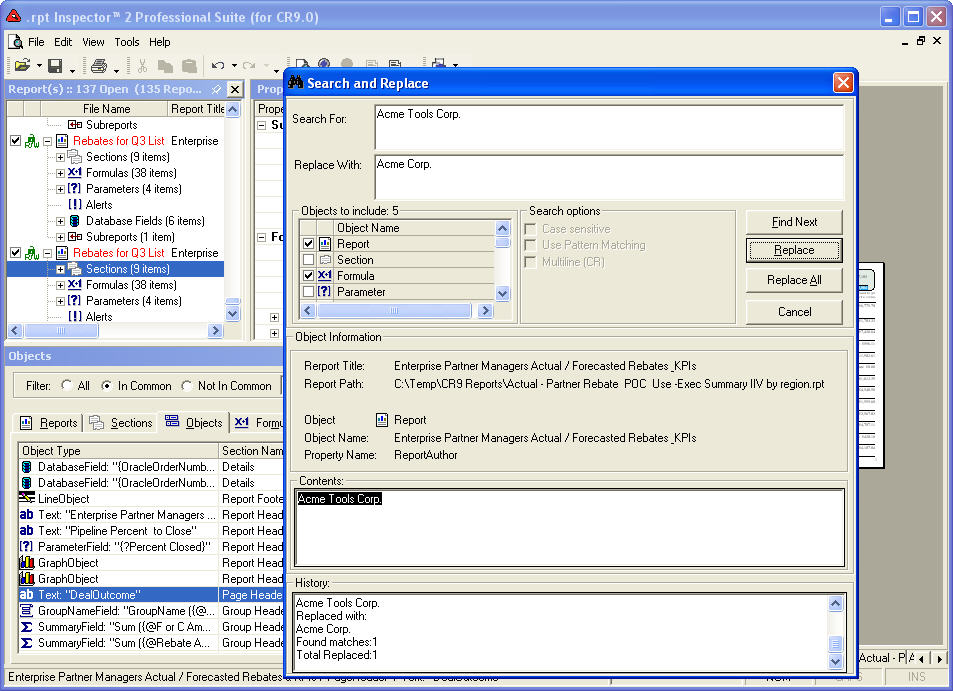
Improved in v3 - Search and Replace
 it
resides (text objects, parameter objects, formula objects, etc.). It's easier than ever to find what you're
looking for and/or replace it with something else. You can even fine tune your search by specifying which
specific types of objects to search.
it
resides (text objects, parameter objects, formula objects, etc.). It's easier than ever to find what you're
looking for and/or replace it with something else. You can even fine tune your search by specifying which
specific types of objects to search.
And if you want to get even fancier, you can take advantage of our pattern matching search and/or replace* which uses regular expressions.
* Denotes a new feature
- Search and Replace Text in all Objects
- Supports Pattern Matching (Regular Expressions) in Search and/or Replace*
- Saves matches on Finds and/or Replaces in History (exportable to Clipboard, CSV, or XML)*
- which report has a formula definition that contains "*.20"
- which text objects contain "Acme Corp."
 it
resides (text objects, parameter objects, formula objects, etc.). It's easier than ever to find what you're
looking for and/or replace it with something else. You can even fine tune your search by specifying which
specific types of objects to search.
it
resides (text objects, parameter objects, formula objects, etc.). It's easier than ever to find what you're
looking for and/or replace it with something else. You can even fine tune your search by specifying which
specific types of objects to search.And if you want to get even fancier, you can take advantage of our pattern matching search and/or replace* which uses regular expressions.
* Denotes a new feature
Text Editor
Find, Analyze, Group By, and Modify
- Text
- Font properties (Font / Font Size / Font Style)
- Color properties (Text Color, Back Color, Border Color)
- Line properties
- Paragraph properties
- Size properties
- Position properties
- and more ...
Standardize Text (edit, copy, paste text -- across
multiple text objects across multiple reports)
Now you can modify the various properties of your text objects with ease. And it's integrated with our Spell
Checker tool with offers custom dictionaries.
- Fonts
- Colors
- Lines
- Paragraphs
- Sizes
- Positions
- and more ...
Formula Editor
All in a powerful easy to use Formula Editor that supports formula validation checking and keyword syntax highlighting in your choice of Crystal or VB formula syntax. And it's integrated with our Spell Checker tool.
- Find, Analyze, Group By, and Modify Definition Text (with Crystal and VB Syntax highlighter and Validation)
- Standardize Formulas (edit, copy, paste definition text across multiple formulas across multiple Crystal Reports)
- variations on previous formulas
- almost the same and you want to standardize them
- in need of updates or changes
All in a powerful easy to use Formula Editor that supports formula validation checking and keyword syntax highlighting in your choice of Crystal or VB formula syntax. And it's integrated with our Spell Checker tool.
Parameter Editor
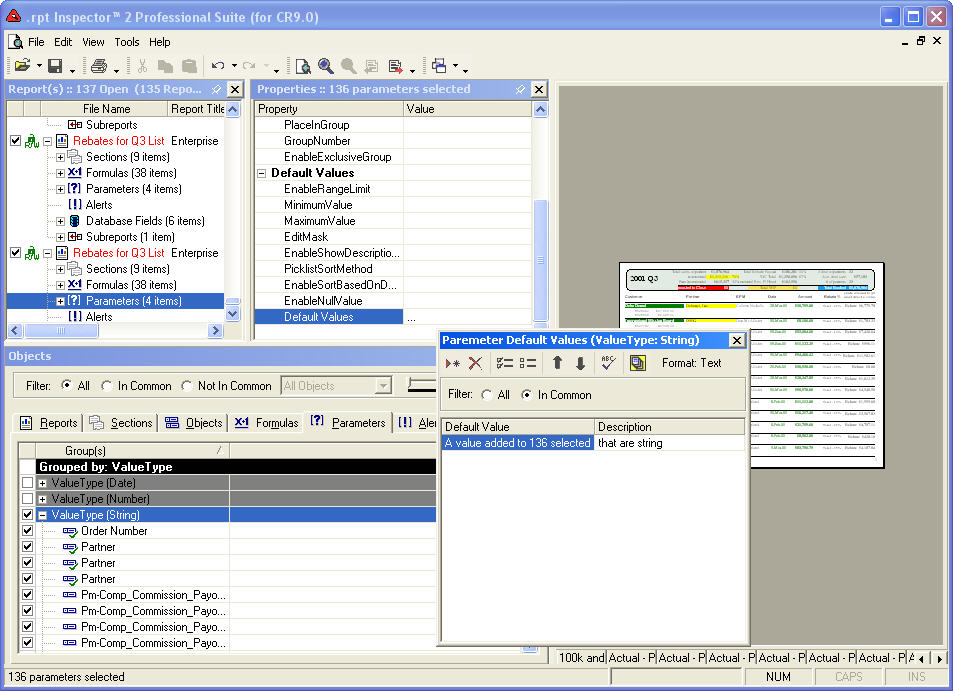
 With
our Parameter Editor (default values editor) you can select multiple parameters across one or many
reports and you can append or overwrite default values with ease.
With
our Parameter Editor (default values editor) you can select multiple parameters across one or many
reports and you can append or overwrite default values with ease.
Another way to work with parameter default values is our one-to-many copy relationship. This allows you to select your source, copy its values, and paste them to as many destinations as necessary.
And it's integrated with our Spell Checker tool.
- Find, Analyze, Group By, and Modify Prompt, Default Values, and more ...
- Standardize Parameters (edit, copy from source and paste to multiple destinations across multiple reports, add new values, change order, etc.)

 With
our Parameter Editor (default values editor) you can select multiple parameters across one or many
reports and you can append or overwrite default values with ease.
With
our Parameter Editor (default values editor) you can select multiple parameters across one or many
reports and you can append or overwrite default values with ease.Another way to work with parameter default values is our one-to-many copy relationship. This allows you to select your source, copy its values, and paste them to as many destinations as necessary.
And it's integrated with our Spell Checker tool.
Improved in v3 - SQL Expressions Editor
The DefinitionText property is powered by the same powerful Formula Editor that supports formula validation checking and keyword syntax highlighting in your choice of Crystal or VB formula syntax. And it's integrated with our Spell Checker tool.
- Find, Analyze, Group By, and Modify
- Name
- Formula Name
- Value Type
- Definition Text
- NumberOfBytes
The DefinitionText property is powered by the same powerful Formula Editor that supports formula validation checking and keyword syntax highlighting in your choice of Crystal or VB formula syntax. And it's integrated with our Spell Checker tool.
Objects Editor
When you design a report, in addition to the database fields you can put on the design, can also create various objects (Box, Text, Formula, Parameter, SQL Expression, etc.) and put some or all of them on the design of the Crystal Report.
The Objects Editor is designed to work with only those objects that appear on the design (the objects that are in use) of the report. Those objects that do not appear on the design (those that were created but are not being used) can still be accessed and worked with their respective editors (Formula, SQL Expression, Parameter, Running Total, Alert, etc.) on the respective Tab of the Objects Grid.
Now you can see and modify the various properties of your objects with ease.
All conditional formulas are powered by the same powerful Formula Editor that supports formula validation checking and keyword syntax highlighting in your choice of Crystal or VB formula syntax. And it's integrated with our Spell Checker tool.
Find, Analyze, Group By, and Modify objects that appear and
are used on the Crystal Reports design
- Blob Field
- Box
- CrossTab
- Database Field
- Formula Field
- Graph
- Group Name
- Line
- Map
- Olap Grid
- Ole
- Parameter Fields
- Running Total
- SQL Expression
- Summary
- Special
- Text
- and more ...
Standardize object properties (across multiple text
objects across multiple Crystal Reports)
- Borders
- Colors
- Currency Formatting
- Date Formatting
- Fonts
- Lines
- Number Formatting
- Paragraph Formatting
- Positions
- Sizes
- Conditional Formulas
- and more ...
When you design a report, in addition to the database fields you can put on the design, can also create various objects (Box, Text, Formula, Parameter, SQL Expression, etc.) and put some or all of them on the design of the Crystal Report.
The Objects Editor is designed to work with only those objects that appear on the design (the objects that are in use) of the report. Those objects that do not appear on the design (those that were created but are not being used) can still be accessed and worked with their respective editors (Formula, SQL Expression, Parameter, Running Total, Alert, etc.) on the respective Tab of the Objects Grid.
Now you can see and modify the various properties of your objects with ease.
All conditional formulas are powered by the same powerful Formula Editor that supports formula validation checking and keyword syntax highlighting in your choice of Crystal or VB formula syntax. And it's integrated with our Spell Checker tool.
Improved in v3 - Running Totals Editor
- Find, Analyze, Group By, and Modify
- Name
- RunningTotalFieldName
- Value Type
- HierarchicalSummaryType
- NumberOfBytes
Section Editor
- Find, Analyze, Group By, and Modify Sections
- Name
- AreaName
- Number
- Number Of Objects
- Color and Size (Back Color, Conditional Formula, Width, Height, MinimumHeight)
- CssClass
- HideForDrillDown
- Suppress (and Conditional Formula)
- SuppressIfBlank (and Conditional Formula)
- PrintAtBottomOfPage (and Conditional Formula)
- NewPageAfter (and Conditional Formula)
- NewPageBefore (and Conditional Formula)
- ResetPageNumberAfter (and Conditional Formula)
- KeepTogether (and Conditional Formula)
- UnderlaySection
- and more ...
Set Default Printer
Use our Printer Change Wizard to quickly and easily change the default printer and its properties across multiple Crystal Reports at the same time.
- Change the default printer on your Crystal Reports
Use our Printer Change Wizard to quickly and easily change the default printer and its properties across multiple Crystal Reports at the same time.
Alerts Editor
The formula modifications are powered by the same powerful Formula Editor that supports formula validation checking and keyword syntax highlighting in your choice of Crystal or VB formula syntax. And it's integrated with our Spell Checker tool.
- Find, Analyze, Group By, and Modify SQL Expressions
- Definition Name
- ConditionFormula
- DefaultMessage
- MessageFormula
The formula modifications are powered by the same powerful Formula Editor that supports formula validation checking and keyword syntax highlighting in your choice of Crystal or VB formula syntax. And it's integrated with our Spell Checker tool.
Spell Checker
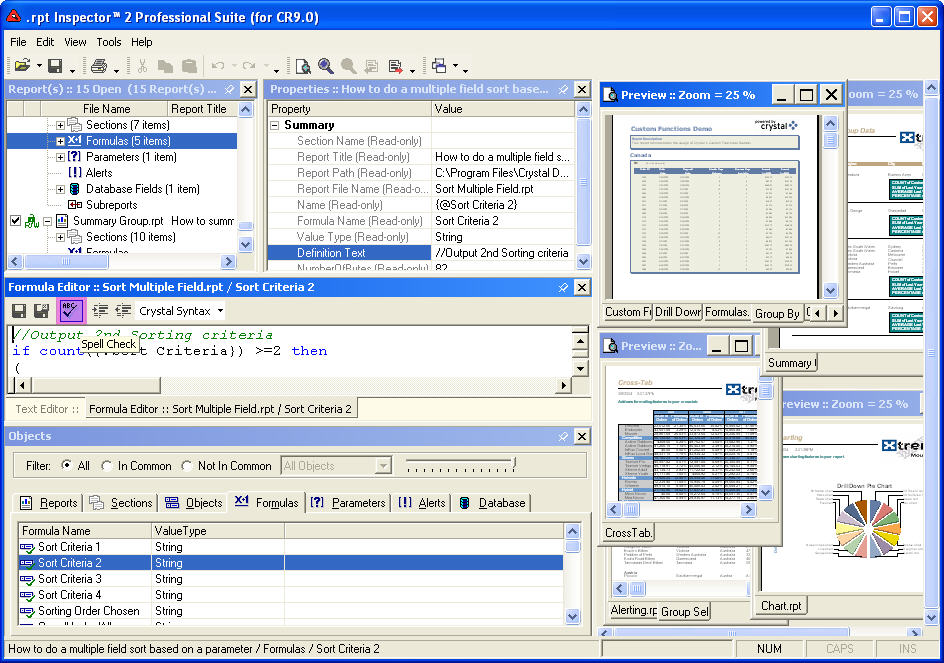
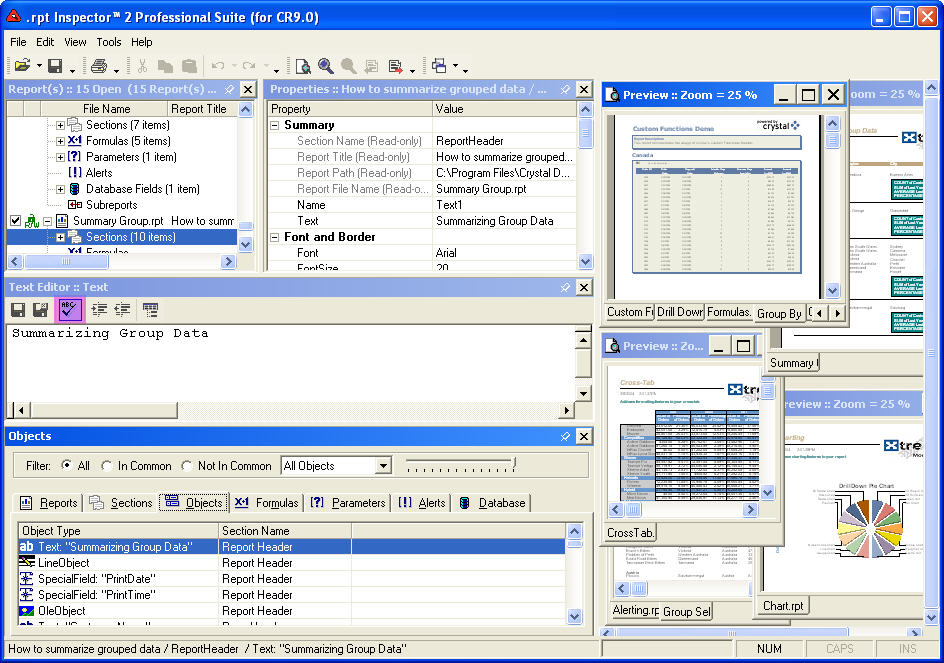
 Now you
can spell check your text and even add custom words to the dictionary. No more embarrassing typos.
Now you
can spell check your text and even add custom words to the dictionary. No more embarrassing typos.
The spell checker is available in our Text, Formula, and Parameter editors.

 Now you
can spell check your text and even add custom words to the dictionary. No more embarrassing typos.
Now you
can spell check your text and even add custom words to the dictionary. No more embarrassing typos.The spell checker is available in our Text, Formula, and Parameter editors.
Report Playlists
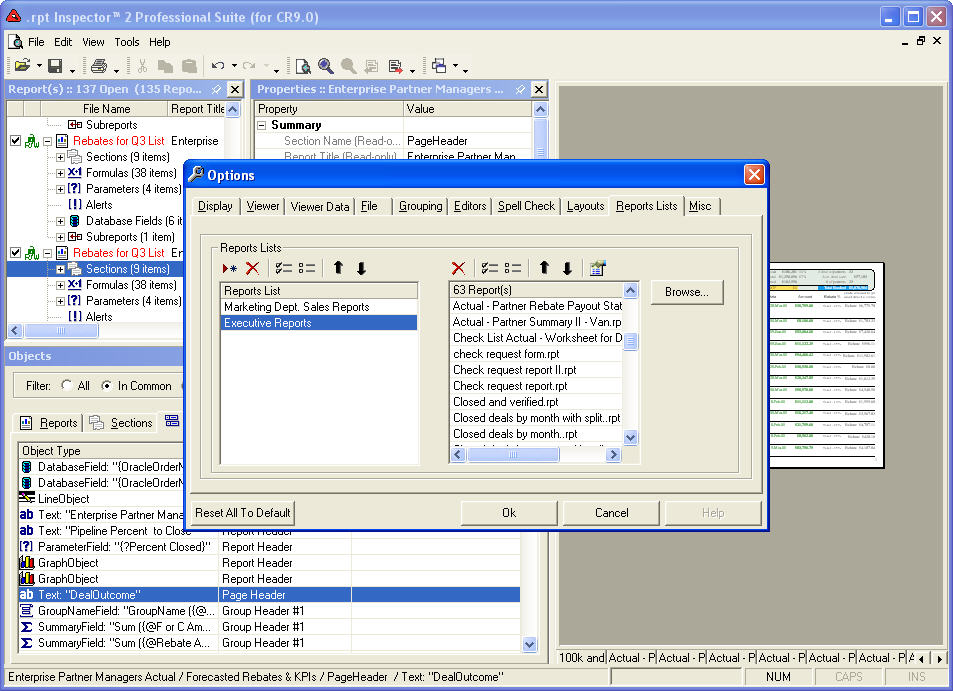
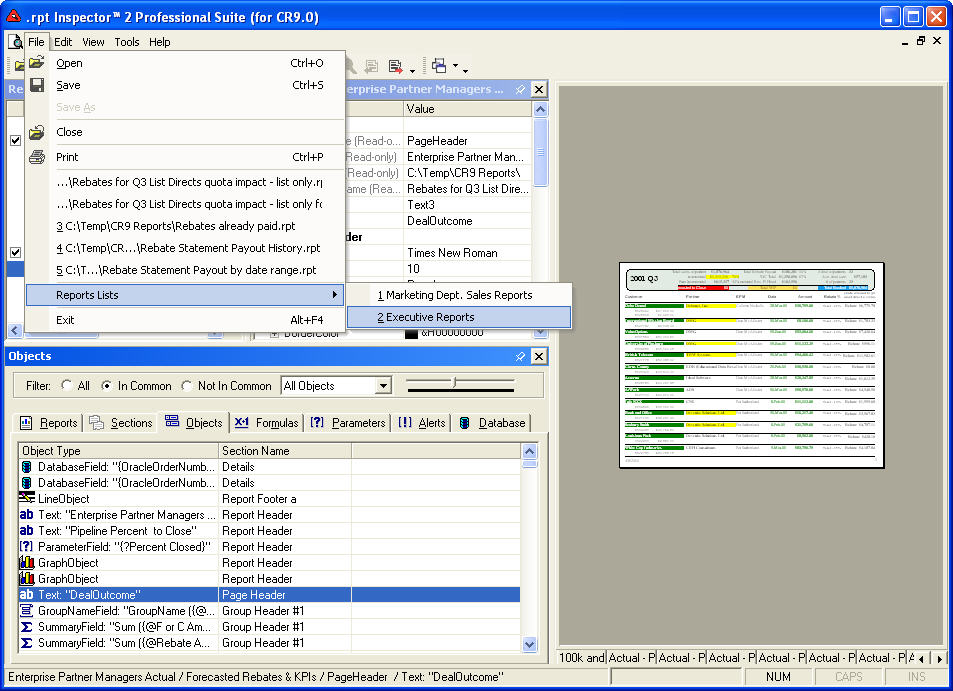
 Do
you work with the same sets of Crystal Reports? You no longer need to open them one at a time (even if you
select multiple Crystal Reports in the open dialog you'll love this feature).
Do
you work with the same sets of Crystal Reports? You no longer need to open them one at a time (even if you
select multiple Crystal Reports in the open dialog you'll love this feature).
Just like an MP3 playlist, you can create a virtually unlimited number of Report Lists. Add to each report list any number of Crystal Reports you'd like, from any directory on your system or mapped drive.
Then click on a report list and it will automatically open all Crystal Reports in the list.
- Similar in concept to MP3 Playlists
- Create a virtually unlimited number of Report Lists
- Each report list can have a virtually unlimited number of Crystal Reports (sorted in your preferred order) from various directories on the file system and/or folders in APS/CMS
- Opening a Report List automatically opens all associated Crystal Reports
 Do
you work with the same sets of Crystal Reports? You no longer need to open them one at a time (even if you
select multiple Crystal Reports in the open dialog you'll love this feature).
Do
you work with the same sets of Crystal Reports? You no longer need to open them one at a time (even if you
select multiple Crystal Reports in the open dialog you'll love this feature).Just like an MP3 playlist, you can create a virtually unlimited number of Report Lists. Add to each report list any number of Crystal Reports you'd like, from any directory on your system or mapped drive.
Then click on a report list and it will automatically open all Crystal Reports in the list.
Multiple Report Viewers / Preview Windows
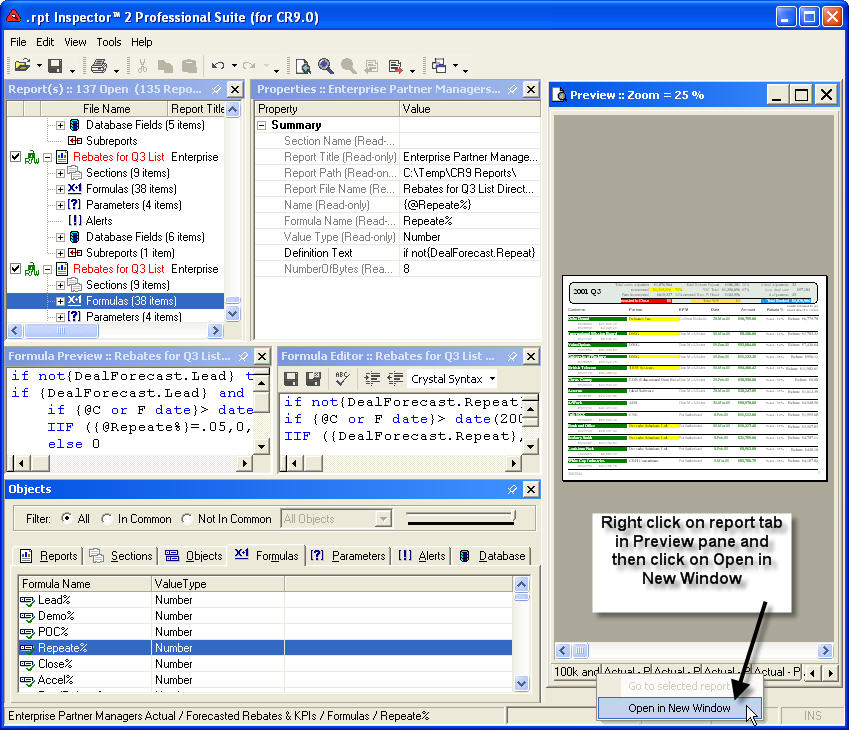
 In
addition to showing you open sub-reports as a separate tab (configurable in TOOLS | OPTIONS), we have now given
you the ability to open a virtually unlimited amount of preview windows. Simply right click on one of the report
tabs in the preview viewer pane and select Open In A New Window open.
In
addition to showing you open sub-reports as a separate tab (configurable in TOOLS | OPTIONS), we have now given
you the ability to open a virtually unlimited amount of preview windows. Simply right click on one of the report
tabs in the preview viewer pane and select Open In A New Window open.
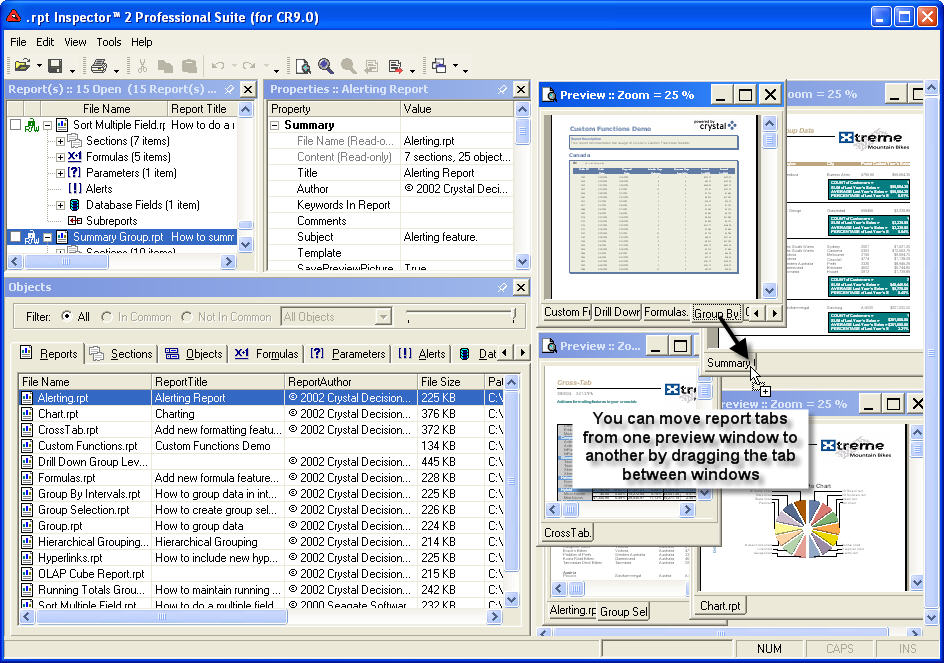
But we didn't stop there. You can drag and drop the report tabs between all open preview windows. And if you want your sub-reports to automatically follow, turn it on in TOOLS | OPTIONS.
This powerful feature allows you to quickly and easily see your changes come to live to multiple previews at the same time.
- See multiple Crystal Reports in their own preview window
- Visually compare Crystal Reports
 In
addition to showing you open sub-reports as a separate tab (configurable in TOOLS | OPTIONS), we have now given
you the ability to open a virtually unlimited amount of preview windows. Simply right click on one of the report
tabs in the preview viewer pane and select Open In A New Window open.
In
addition to showing you open sub-reports as a separate tab (configurable in TOOLS | OPTIONS), we have now given
you the ability to open a virtually unlimited amount of preview windows. Simply right click on one of the report
tabs in the preview viewer pane and select Open In A New Window open.But we didn't stop there. You can drag and drop the report tabs between all open preview windows. And if you want your sub-reports to automatically follow, turn it on in TOOLS | OPTIONS.
This powerful feature allows you to quickly and easily see your changes come to live to multiple previews at the same time.
Additional Built-In Features with Screen Shots (click for details)
Open Multiple Reports or Entire Folders (and sub-folders)
.rpt Inspector 3 Professional Suite is available in 5 editions. Each is feature for feature identical:
(see Specifications page for requirements and supported file format(s) for each edition)
.rpt Inspector 3 Professional Suite is available in 5 editions. Each is feature for feature identical:
(see Specifications page for requirements and supported file format(s) for each edition)
- .rpt Inspector 3 Professional Suite (for CR 8.5)
reads Crystal Reports 5.x - Crystal Reports 8.5 & writes in Crystal Reports 7.x or 8.x file format. - .rpt Inspector 3 Professional Suite (for CR 9)
reads Crystal Reports 5.x - Crystal Reports 9 & writes in Crystal Reports 9 file format. - .rpt Inspector 3 Professional Suite (for CR 10)
reads Crystal Reports 5.x - Crystal Reports 10 & writes in Crystal Reports 10 file format. - .rpt Inspector 3 Professional Suite (for CR XI)
reads Crystal Reports 5.x - Crystal Reports XI & writes in Crystal Reports XI file format. - .rpt Inspector 3 Professional Suite (for CR XIr2)
reads Crystal Reports 5.x - Crystal Reports XI Release 2 & writes in Crystal Reports XI Release 2 file format.
ODBC / DAO / OLE DB / Native DB2 / Native Informix / Native Oracle / Native SQL Server / Native Sybase - product wide support
In version 1 we supported ODBC for the preview viewer and the datasource wizard.
 As of
version 2, we've greatly expanded our connectivity support.
As of
version 2, we've greatly expanded our connectivity support.
Now updated with native support for Crystal Reports stored in Business Objects Enterprise / Crystal Enterprise.
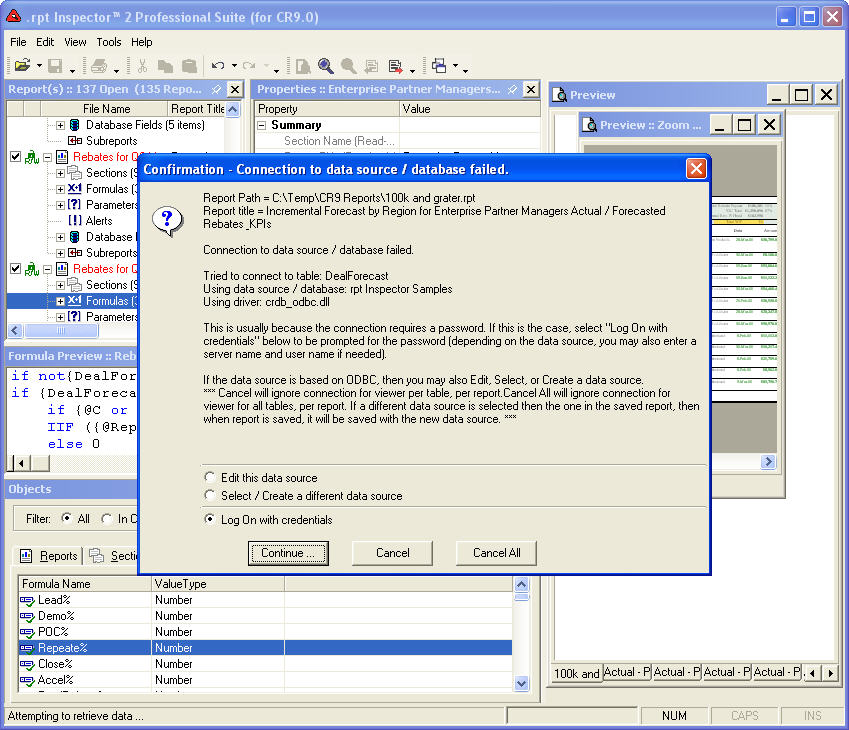
Now when enabling the preview viewer and making a connection to a database, you'll be prompted to enter a user id and password if necessary on all supported connectivity methods. For connectivity methods that require specifying more information then just a user id and password (OLE DB and Native drivers) we completely support this too.
In version 1 we supported ODBC for the preview viewer and the datasource wizard.
 As of
version 2, we've greatly expanded our connectivity support.
As of
version 2, we've greatly expanded our connectivity support.Now updated with native support for Crystal Reports stored in Business Objects Enterprise / Crystal Enterprise.
Now when enabling the preview viewer and making a connection to a database, you'll be prompted to enter a user id and password if necessary on all supported connectivity methods. For connectivity methods that require specifying more information then just a user id and password (OLE DB and Native drivers) we completely support this too.
Drag and Group
Originally introduced in version 1, our patent pending technology allows you to quickly and easily analyze properties across objects and reports.
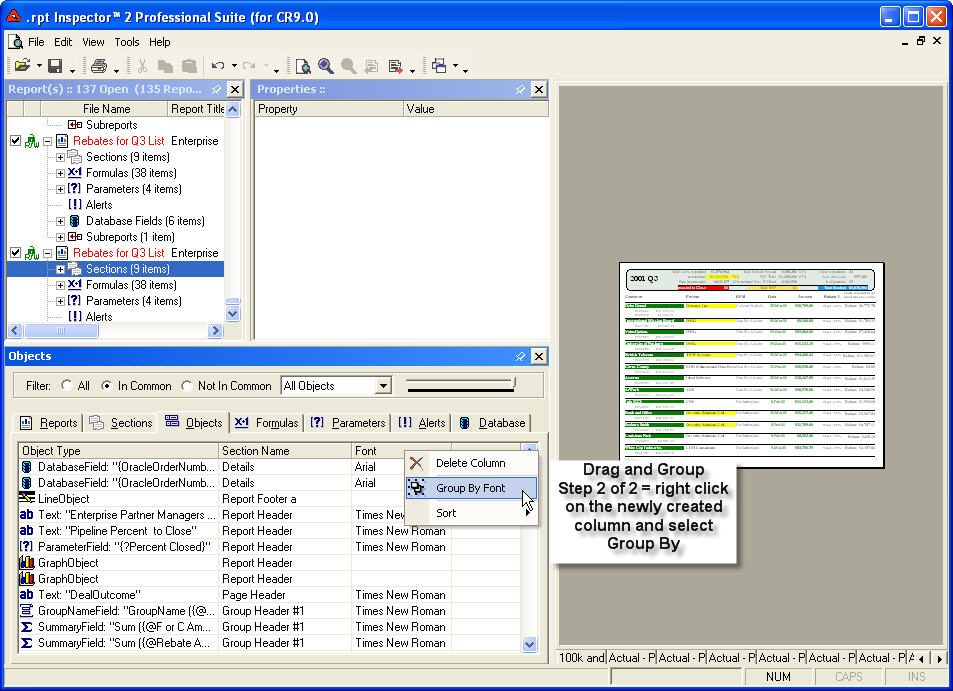
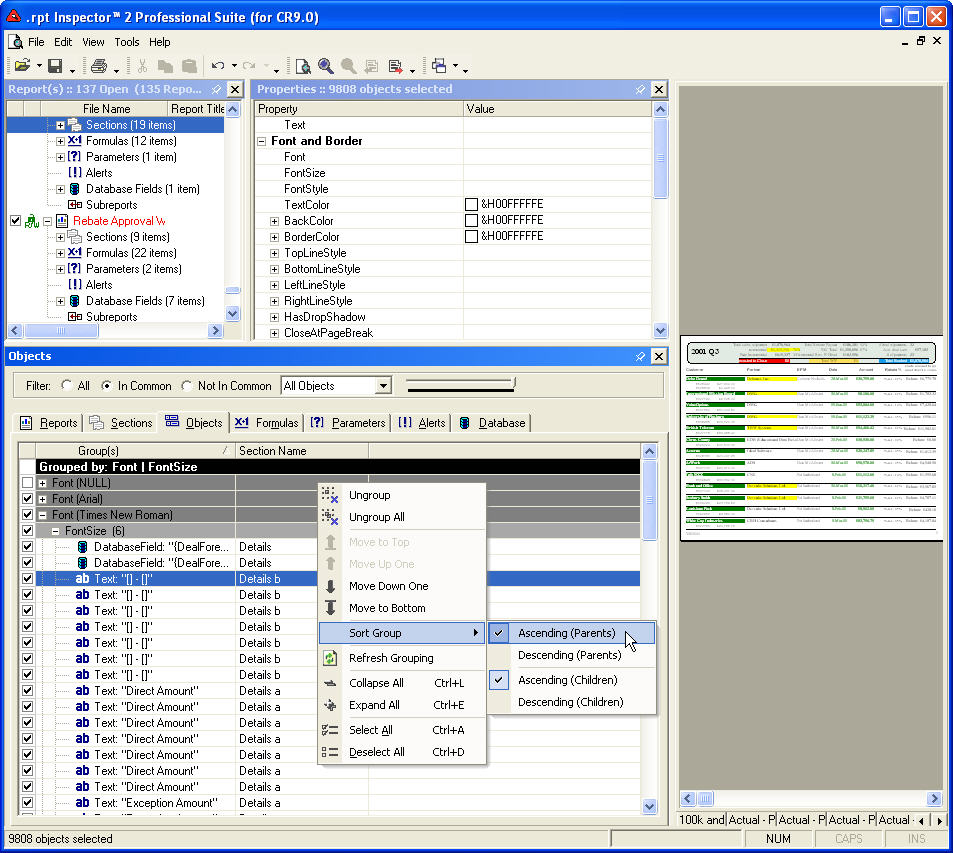
Drag and Group is the concept of selecting item(s) in the Objects pane, and dragging one or more properties from the Property pane down to the Objects pane (to any grid on any tab) to create a new column.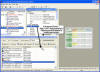
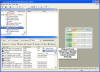
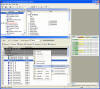 Then right
clicking on the column header and selecting group by object name (where the object name is the name of the
column; i.e. font; font color, formula, etc.). The result is a pivot view.
Then right
clicking on the column header and selecting group by object name (where the object name is the name of the
column; i.e. font; font color, formula, etc.). The result is a pivot view.
And now as of version 2, we've further optimized performance on grouping and moving items within the groupings (top / bottom / up one / down one). Plus we've exposed the grouping level color configuration and added support for auto-refresh of groupings.
Originally introduced in version 1, our patent pending technology allows you to quickly and easily analyze properties across objects and reports.
Drag and Group is the concept of selecting item(s) in the Objects pane, and dragging one or more properties from the Property pane down to the Objects pane (to any grid on any tab) to create a new column.
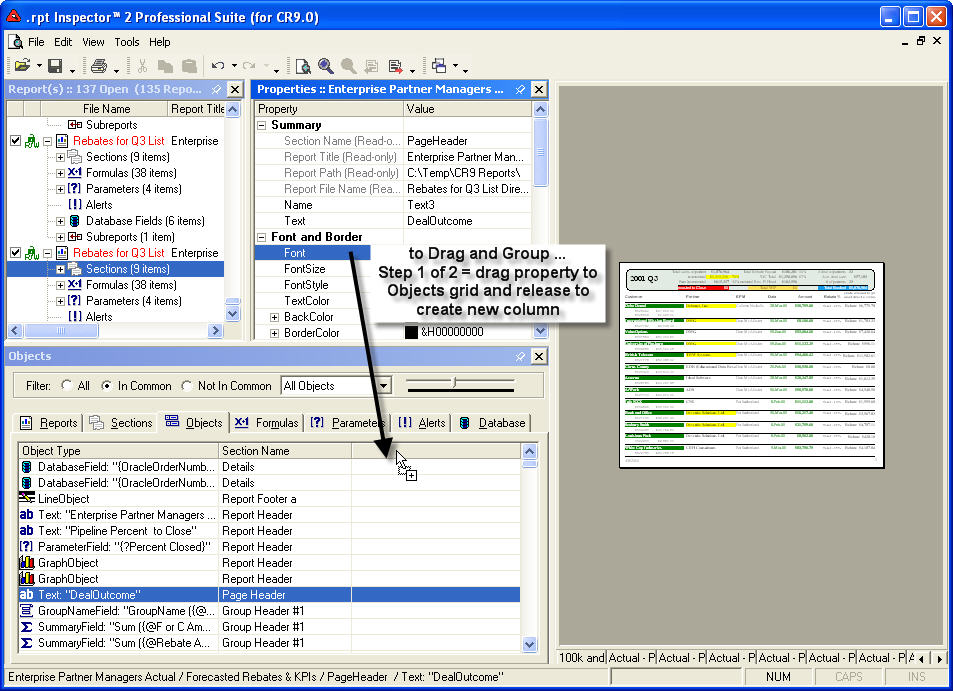
 Then right
clicking on the column header and selecting group by object name (where the object name is the name of the
column; i.e. font; font color, formula, etc.). The result is a pivot view.
Then right
clicking on the column header and selecting group by object name (where the object name is the name of the
column; i.e. font; font color, formula, etc.). The result is a pivot view.And now as of version 2, we've further optimized performance on grouping and moving items within the groupings (top / bottom / up one / down one). Plus we've exposed the grouping level color configuration and added support for auto-refresh of groupings.
Dockable and Floatable window panes and menus
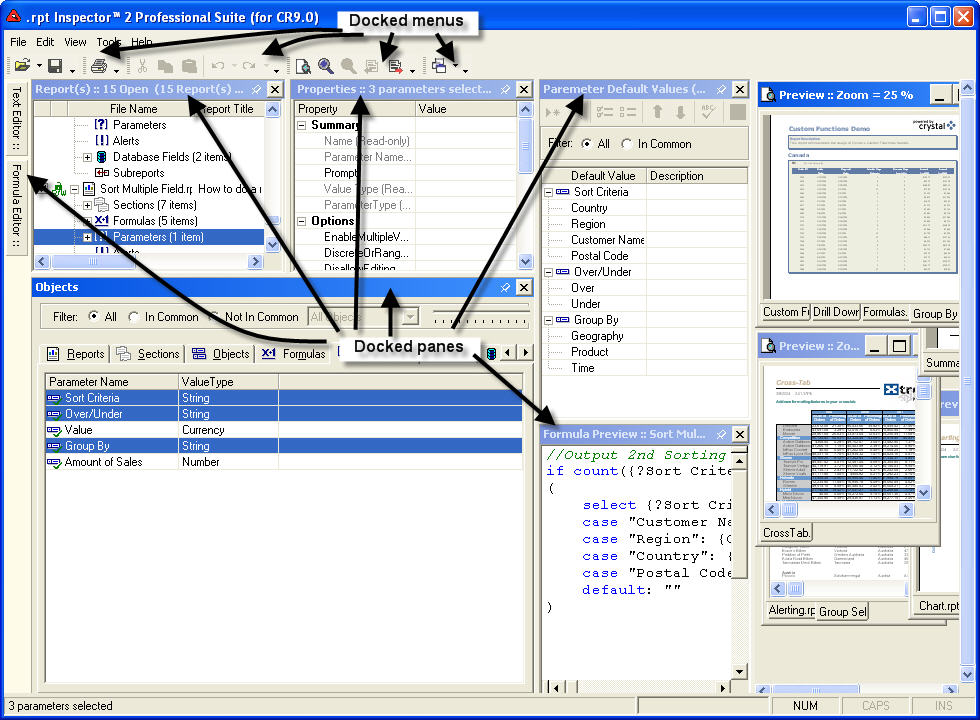
All window panes
and menus dockable and floatable. This gives you ultimate control of the user interface to customize as you see
fit.
panes
and menus dockable and floatable. This gives you ultimate control of the user interface to customize as you see
fit.
Many editors (text, formulas, parameters, etc.) have also support docking.
All window
 panes
and menus dockable and floatable. This gives you ultimate control of the user interface to customize as you see
fit.
panes
and menus dockable and floatable. This gives you ultimate control of the user interface to customize as you see
fit.Many editors (text, formulas, parameters, etc.) have also support docking.
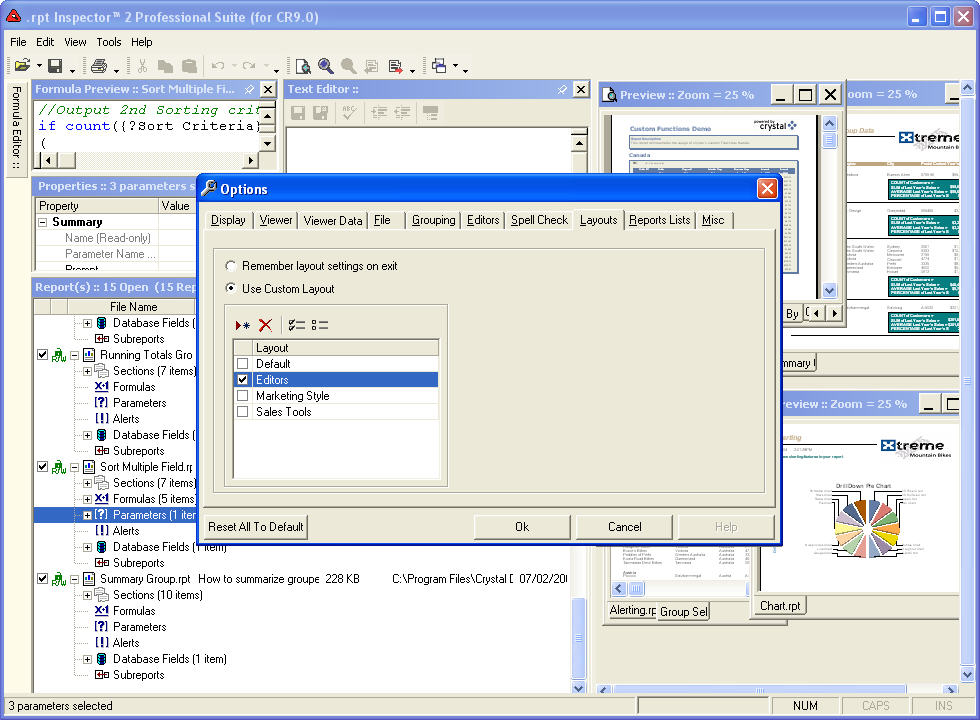
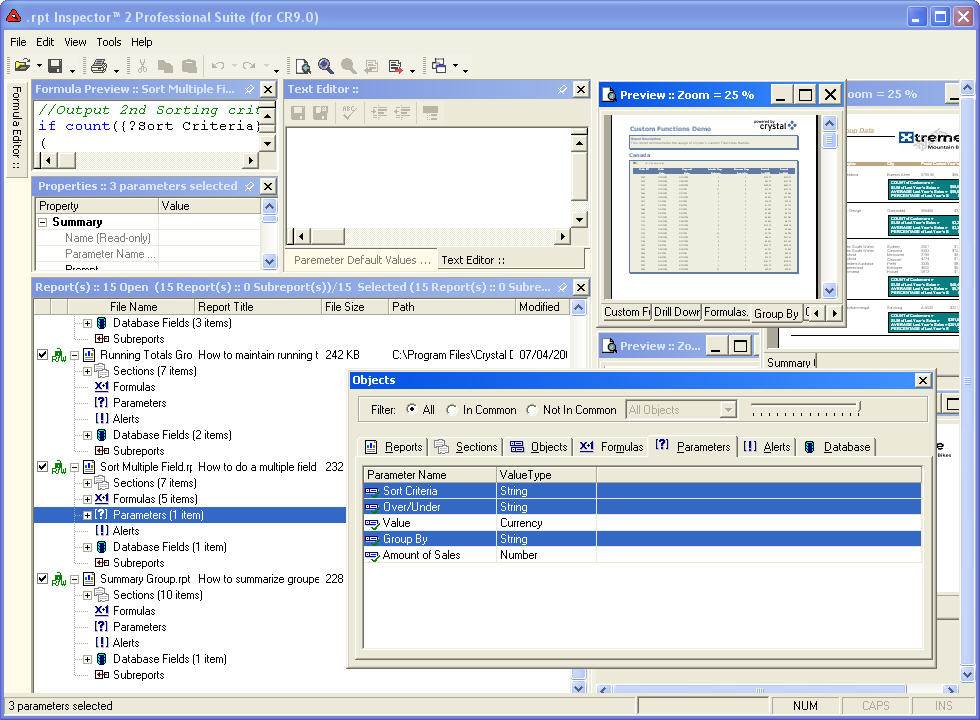
Customizable layouts
With our dockable and floatable window panes and menus, you'll want to customize the layout that suits you
 best. So we've given you the ability to save a virtually unlimited number of customizable layouts that you can
quickly and easily switch to on the fly.
best. So we've given you the ability to save a virtually unlimited number of customizable layouts that you can
quickly and easily switch to on the fly.
But don't worry. It's easy to return back to the default layout at anytime.
With our dockable and floatable window panes and menus, you'll want to customize the layout that suits you
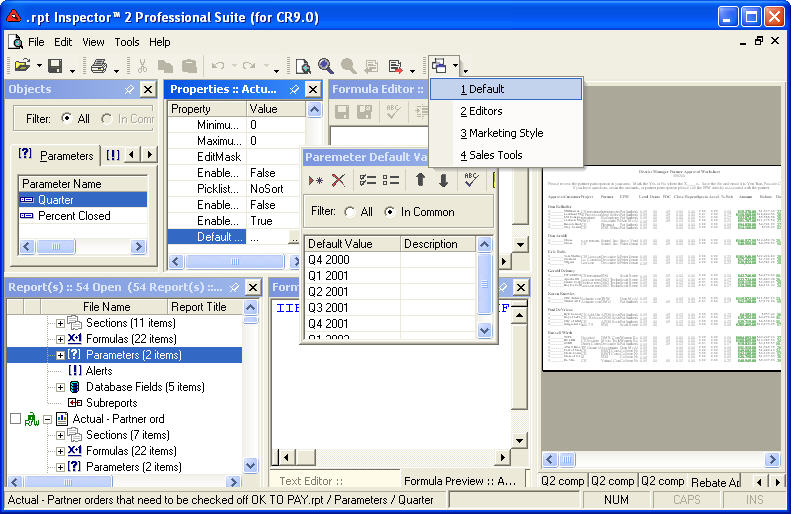
 best. So we've given you the ability to save a virtually unlimited number of customizable layouts that you can
quickly and easily switch to on the fly.
best. So we've given you the ability to save a virtually unlimited number of customizable layouts that you can
quickly and easily switch to on the fly.But don't worry. It's easy to return back to the default layout at anytime.






























